Recent | Online | Vintage | Modern | XP | Win | Mac  OS9 | DOS | Amiga | Atari ST | Graphics | Midi io | Sequencers | Roland "MC" | E-mu | Ensoniq | Akai MPCs | Samplers | Akai "S" | Roland "S"Synths | VST Samplers | VST Synths | Roland "JV" | Modules | Drums | Mixers | Timeline | HackintoshArtists | Graphics

Welcome to Oldschooldaw.com! (Online since 2014) serving vintage computers worldwide! this is our NEW WEBHOST as we've moved from our OLD GODADDY to a brand new server location to start off 2026. thanks to Godaddy for hosting the site for 11 years and a big thank you to IONOS.COM for the great pricing going forward!

Author Topic: Using Multiple MIDI Output Devices With Win3.1/95/98 via MIDI MAPPER  (Read 6959 times)

0 Members and 1 Guest are viewing this topic.

Offline chrisNova777

  • Underground tech support agent
  • Administrator
  • Posts: 9989
  • Gender: Male
  • "Vintage MIDI Sequencing + Audio Production"
    • www.oldschooldaw.com | vintage audio production software + hardware info
http://www.pgmusic.com/tutorial_multiple_midi_devices.htm
see original article for illustrtions

Quote

Many        of        our        Windows        users        have        questions        regarding        MIDI        driver        setup:


  • "How        do        I        get        the        drums        to        play        out        of        my        Alesis        drum        machine?"        
  •                                                                                                                                                                
  • "I        like        the        upper        bank        sounds        from        my        Awe32,        but        I        prefer        the        piano        patch        from        the        Roland        SCC1.        How        can        I        get        them        to        play        back        at        the        same        time?"        
  •                                                                                                                                                                
  •        "I've        upgraded        from        Window        3.1        to        Windows        95        /        98,        and        can't        find        the        MIDI        Mapper!"        
  •                                                                                                                        
                                                                                                                       

The        answers        to        most        of        these        problems        is        in        the        elusive        MIDI        MAPPER.        Let's        get        back        to        basics        for        a        bit.        Here's        some        terminology        you        should        know:


Channel


Songs        can        be        separated        into        channels        to        allow        more        than        one        instrument        to        play        at        the        same        time.        There        are        16        MIDI        channels        in        total.        Each        channel        can        use        only        a        single        instrument(patch)        at        a        time.        This        is        analogous        to        a        TV.        Imagine        you        have        the        only        MIDI        TV        on        your        block.        On        your        TV,        you        have        16        Channels.        Only        one        program        per        channel        is        on        at        the        same        time.        This        seems        logical        right?        In        other        words,        if        you        had        your        MIDI        TV        channel        1        set        to        Piano,        only        Piano        could        play        on        that        channel        until        you        told        it        otherwise.        Changing        piano        to        Slap        Bass        would        require        a        us        to        change        the        program,        also        called        a        Patch        change.        Some        common        channel        settings        are:


  •        Channel        3        for        Piano        
  •                                                                                                                                                                
  •        Channel        2        for        Bass        
  •                                                                                                                                                                
  •        Channels        10        or        16        for        Drums.        
  •                                                                                                                        
                                                                                                                       

Patch


Patches        are        used        to        select        your        particular        instrument.        You        have        patches        for        different        sounds,        such        as        piano,        strings,        bass        or        guitar.        When        you        change        from        one        instrument        to        another        on        a        channel,        it        is        called        a        patch        change.


Your        MIDI        system        can        play        up        to        16        channels        simultaneously.        You        could        set        Channel        7        to        Bass,        Channel        3        to        piano,        and        Channel        10        to        drums.        The        question        then        becomes:        If        you        have        multiple        MIDI        devices,        how        do        you        assign        different        channels        to        each        device        separately?


Setting        up        the        Windows        95        Midi        Mapper


We'll        be        using        PowerTracks        Pro        Audio        for        this        tutorial,        to        illustrate        the        effective        use        of        the        MIDI        mapper.


The        MIDI        mapper        is        included        with        Windows        95.        It        has        been        scaled        down        a        bit        from        Windows        3.1,        but        it        is        still        a        handy        tool.


Note:        If        you        do        not        have        more        than        one        installed        MIDI        device,        the        following        information        is        good        reference,        but        you        should        continue        to        use        the        default        settings        that        Windows        95        assigns        you.


If        you        access        Control        Panel        |        Multimedia        icon,        and        then        choose        the        MIDI        tab,        you        will        see        something        like        the        following.
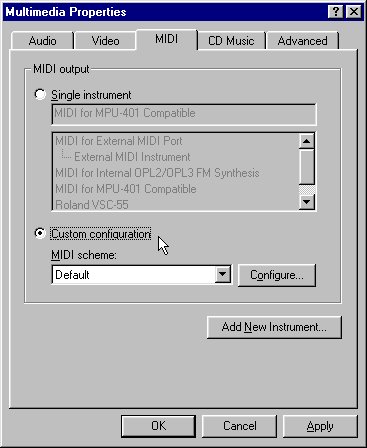
                                                                                                                       

You        may        or        may        not        have        the        devices        available        that        you        see        here.        Choose        the        Custom        Configuration        button.        You        will        notice        that        the        Single        Instrument        dialog        box        becomes        faded.        This        indicates        that        we        are        choosing        our        own        output        devices.        Continuing        with        our        process,        we        will        select        the        Configure        button.        This        will        bring        up        the        following        dialog.
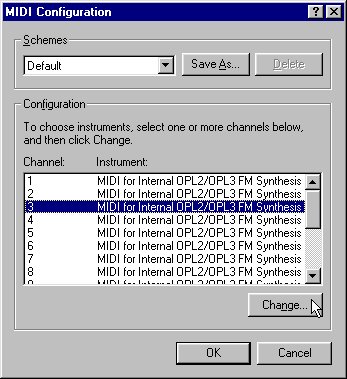


Notice        the        channel        numbers        along        the        left        hand        side.        These        indicate        where        the        output        of        each        of        these        MIDI        channels        is        currently        set,        in        this        case        they        are        all        set        to        Internal        OPL2/OPL3        FM        Synthesis,        another        name        for        the        MIDI        sounds        on        the        installed        SoundBlaster        16        card.


However,        I        do        have        a        Roland        SCCI        card        installed        in        this        machine.        You        may        have        another        device,        like        a        keyboard        or        drum        machine,        but        the        process        is        identical.        If        we        highlight        a        channel        (I've        highlighted        channel        3)        and        hit        the        change        button,        the        following        dialog        appears:
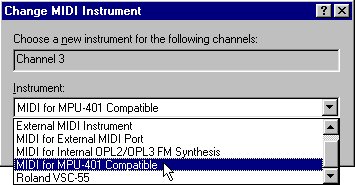
                                                                                                                                                                                                                                               

From        this        dialog,        I        choose        MIDI        for        MPU-401        Compatible.        This        is        the        name        that        Microsoft        gave        my        Roland        SCC1        driver.        After        I        select        OK,        the        MIDI        configuration        screen        displays        the        changes        I        have        made.
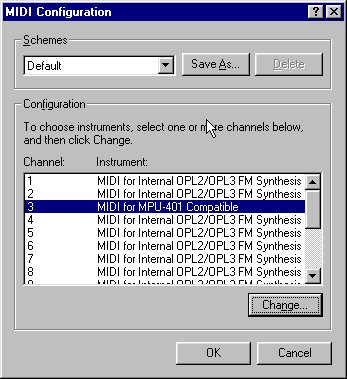
                                                                                                                                                                                                                                               

We        can        continue        in        this        fashion        assigning        each        of        the        16        channels        to        different        instruments.        I        later        set        my        channel        10        (Drums)to        the        Roland        Virtual        Sound        Canvas-55*.        If        you        had        a        dedicated        drum        machine,        you        could        assign        it        channel        10        instead.


*Note        this        was        for        this        demonstration        only,        due        to        latency,        assigning        any        software        synthesizer        in        combination        with        hardware        synthesizers        can        result        in        strange        and        out-of-time        sounds!


After        saving        my        scheme        using        the        Save        As..        button        at        the        top        of        the        MIDI        Configuration        window,        we're        all        set        to        use        our        software.        This        scheme        will        affect        ALL        MIDI        data        from        every        software        program,        including        Band-in-a-Box,        PowerTracks,        the        Media        Player        and        so        on.        It        is        also        good        to        know        that        you        can        save        multiple        schemes        in        this        way,        assigning        different        channels        to        different        MIDI        instruments        as        the        need        arises,        and        retrieving        these        setups        quickly.        


Testing        our        new        Configuration


Now        we        can        start        PowerTracks        Pro        Audio.        PowerTracks        is        a        very        clever        program        itself,        and        like        the        MIDI        mapper,        can        access        your        hardware        directly.        However,        we        want        to        use        our        new        custom        scheme.


Pull        up        the        MIDI        Driver        Setup        dialog        from        Options        |        MIDI        Devices...        and        you        will        see        the        following        dialog.        I        deselect        any        current        Output        Drivers,        and        select        only        the        MIDI        mapper.        This        ensures        that        PowerTracks        Pro        Audio        will        use        my        new        MIDI        mapper        scheme.        After        you        select        the        OK        button,        PowerTracks        will        be        configured        to        use        the        MIDI        Mapper.
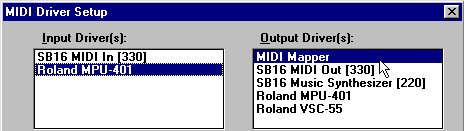
                                                                                                                                                                                                                                               

Now        it's        time        for        the        test.        I        will        open        one        of        the        demo        *.seq        songs        included        with        PowerTracks.        I'll        choose        I_Said.seq,        because        it        has        a        few        instruments        on        different        channels.        Use        File        |        open        for        this        procedure.        You'll        find        I_Said.seq        in        your        PT        directory.


Notice        in        the        circled        area        below        that        PowerTracks        tells        you        what        channel        you're        currently        using        for        that        track.        Now        comes        the        fun.        I'll        push        play,        and...


Success!        As        I        mute        each        track        separately,        (Double-clicking        on        the        "P"        beside        the        track        name        will        change        it        to        an        "m"        for        Mute)        I        can        hear        distinctively        the        differences        between        my        newly        mapped        devices.


Remember,        this        information        is        useful        for        those        of        you        with        both        internal        sound        cards        and        external        keyboard-synths        and/or        modules.        Try        making        up        many        different        MIDI        configuration        schemes        to        your        preferred        sounds,        and        remember,        if        you        mess        it        up,        you        can        still        select        DEFAULT        as        a        MIDI        scheme.        This        will        restore        your        defaults.


Yours        Musically,


David        Godfrey
                                                                                                                                                               PG        Music        Development        Team        

« Last Edit: December 15, 2014, 07:44:36 PM by chrisNova777 »